Pilot example (about $900/month)
Two small app servers, one managed database, 300 GB storage, moderate traffic, daily backups, basic monitoring and log retention.
Operations
How to choose secure hosting and estimate monthly costs using practical founder assumptions.
Workbook: 40 minutes
Hosting is the rented environment where your software lives and runs. It includes the servers, databases, storage, networking, monitoring, and backup systems that keep the product available. For non-technical founders, hosting decisions matter because they shape reliability, security, cost, and how much operational complexity your team has to manage every month.
A common mistake is to treat hosting as a late technical choice. In reality, it affects product design early. The place where your system runs influences how easily you can integrate with partners, how fast you can respond to incidents, how expensive it is to scale, and how much discipline your team needs around access, monitoring, and change control.
This page helps teams treat hosting as a product, risk, and cost decision. Provider choice, managed services, backups, recovery, uptime, data location, support, and monitoring all shape the real operating model.
Use it before pricing, piloting, or promising scale. The right question is not only how much the server costs, but what reliability, privacy, recovery, and support assumptions that cost includes.
Hosting is not just picking a logo. You are selecting an operating environment for your product. The right choice depends on team maturity, required controls, support model, and growth trajectory. For many startups, simplicity and clarity win in early stages; complexity should be added only when it solves a real risk or scaling need.
If your product is early and your team is small, a simpler environment is often the better choice because it reduces the chance of configuration mistakes and makes it easier to understand monthly costs. As the product becomes more important and usage grows, redundancy, stronger monitoring, access control, and disaster recovery become harder to avoid. That is why hosting should evolve with the stage of the company, not stay frozen around early assumptions.
A prototype can often run on a modest setup because the main purpose is learning. A pilot usually needs more discipline because real workflows, early customer expectations, and sensitive data handling create pressure for stronger uptime, logging, backups, and support response. Production requires even more: clearer access control, better alerting, more redundancy, more consistent release processes, and a better plan for recovery when something fails.
This is where many founders underestimate the gap between “working” and “operationally ready.” A system may perform well in a demo but still lack the backup, monitoring, and recovery practices needed for dependable use. Hosting costs often rise not because the software suddenly became more expensive, but because the organization finally starts paying for reliability instead of convenience.
Each provider can be the right choice in the right context. The real difference is not which logo is most respected. The difference is how much complexity your team can manage safely and whether the provider fits your customer environment, integration needs, and internal capabilities.
| Provider | Strengths | Watchouts |
|---|---|---|
| DigitalOcean | Simple setup, predictable pricing, easier onboarding for small teams. | Fewer advanced enterprise controls than hyperscalers. |
| AWS | Very broad service catalog, enterprise-grade security options, mature ecosystem. | Higher complexity and potential for cost sprawl without governance. |
| Azure | Strong enterprise integrations and security tooling, common in large organizations. | Complex service choices; cost management discipline still required. |
DigitalOcean is often easier for a small startup to understand and run. AWS and Azure can support much more complexity and offer broader enterprise features, but they also make it easier to overbuild or lose track of spending. For many founder teams, the best early choice is the one that the team can operate clearly and review confidently, not the one with the longest feature list.
These ranges are useful because they help founders stop thinking in a single number. Hosting costs usually move in steps. You do not gradually drift from a small bill to a large bill by accident. You add capabilities such as redundancy, security tooling, log retention, more storage, or higher availability, and the cost profile changes with them.
| Scenario | User scale | Typical stack | Approx. monthly range |
|---|---|---|---|
| Pilot | 100-500 users | 1-2 app instances, managed DB, object storage, backups, basic monitoring | $300-$1,500 |
| Growth | 1,000-5,000 users | Redundant app tier, managed DB HA, queueing, stronger observability | $2,000-$8,000 |
| Scaling | 10,000+ users | Multi-zone deployment, advanced monitoring/security, larger data footprint | $10,000-$40,000+ |
These examples are directional and assume secure baseline controls, backup retention, and monitoring. They exclude payroll and major one-time implementation projects.
Two small app servers, one managed database, 300 GB storage, moderate traffic, daily backups, basic monitoring and log retention.
Four medium app servers across zones, HA database, 1.5 TB storage, CDN/edge delivery, stronger alerting, 30-90 day logs, regular backups.
Auto-scaling app tier, large HA database cluster, 8 TB storage, high traffic, deep monitoring, longer retention, hardened security tooling.
For founders, the important lesson is not the exact dollar figure. It is understanding what causes the jump. Backup retention, database resilience, traffic growth, security tools, and support expectations all compound. Once a product is relied on by real users, the organization is usually paying for confidence and recovery, not just computing power.
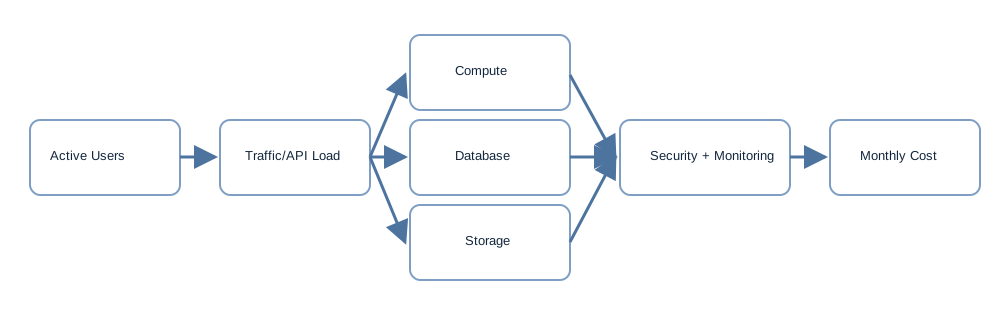
Server invoices are only part of the picture. Teams often forget the operational costs around hosting: setting up monitoring, responding to alerts, rotating keys, reviewing access, handling outages, cleaning up unused resources, and investigating performance issues. These tasks may not look like “product work,” but they are necessary if the product is going to be trusted.
Another common blind spot is overbuilding too early. Teams sometimes pay for a production-grade setup before they have real usage, or they choose a highly flexible cloud architecture that only one engineer understands. Both patterns create waste. The better approach is staged maturity: pay for the controls you truly need now, while designing a path to add stronger controls as product risk and customer expectations rise.
Use the worksheet in monthly-hosting-estimator.csv to model your own numbers.
A good founder exercise is to model three cases: expected, stressed, and conservative. That quickly reveals whether your cost plan depends on optimistic assumptions about usage, storage growth, or uptime requirements.
Ask your technical team to explain hosting in business terms. What does this setup cost us each month? What failure does each major component protect against? What do we lose if one region, database, or service fails? How quickly can we recover? Which parts are hardest to maintain? These questions are direct enough for non-technical leaders and specific enough to expose weak planning.
If you are early, prefer hosting decisions that are easy to understand, easy to monitor, and easy to hand off to future team members. Operational clarity is a real strategic advantage. It reduces dependency on heroics and makes later compliance, procurement, and budgeting conversations much easier.
After this page, read 1) Funding in Canada and Alberta, then 2) Reimbursement and TCO, then 3) Templates and resources to connect technical cost choices with financial planning.
Build a monthly cost estimate for prototype, pilot, and production scenarios using explicit assumptions for users, data, uptime, backups, monitoring, and support.