Microsoft 365 Copilot Resources
Training, examples, and quick-start guides
Session Information
Title: Data and AI Literacy
Presenter: Dr. Sidney Shapiro, Assistant Professor at the University of Lethbridge's Dhillon School of Business
Overview: Dr. Sidney Shapiro develops and delivers courses related to data analytics at the University of Lethbridge's Dhillon School of Business. His research work considers the practical implications of Artificial Intelligence within public and private sector settings.
Data, Analytics, AI, and Business Intelligence are all necessary to make informed decisions. With decision-makers increasingly asking for data-informed approaches to the way we design, deliver and evaluate the services we provide to our internal and external customers, we need to ensure our staff are equipped with the knowledge to be ready to engage a data-driven world. Based on his experience working with other Canadian municipalities, Dr. Shapiro's presentation will help ensure we have a basic understanding of the language that is driving many of our operational conversations today. He will also share trends that are guiding how cities are approaching the use of AI and other emerging technologies.
Key Questions Addressed:
- How do I craft an effective prompt for Copilot?
- How do I ensure the quality of the information that Copilot generates for me?
🚀 Quick Start
New to Copilot? Start here:
- View the slideshow - Complete overview in 20 slides (5-10 min)
- Read Mindset & Fundamentals - Learn the core prompting formula
- Try the exercises - Hands-on practice with real prompts
⚡ Quick Links
Common tasks and quick references:
⚡ Quick Start (5 minutes)
Need to get started immediately? Follow these four steps to begin using Copilot today.
- Learn the mindset: framing + prompt formula (read - 5 min)
- Get copy-ready prompts: common scenarios (ideas - 2 min)
- Practice with exercises: hands-on reps (exercises + examples - 10 min)
- Understand safety: verification & guardrails (trust guide - 5 min)
📚 Complete Learning Path
Follow this structured, comprehensive path to build your Copilot skills from basics to advanced workflows. Recommended for thorough understanding and organizational rollout.
Foundation: Understanding Copilot
Start with the slideshow for a complete overview, then learn the core mindset and prompting fundamentals.
View Slideshow → | Read Mindset & Fundamentals →Practice: Hands-On Exercises
Try real prompts with exercises and examples using actual City of Lethbridge documents.
Try Exercises → | View Examples →Apply: Workflow Ideas
Explore copy-ready prompts for common municipal tasks in Outlook, Word, Excel, and Teams.
Browse Workflow Ideas →Master: Trust & Adoption
Learn how to verify outputs, use Copilot safely, and roll it out across your organization.
Learn Trust & Safety → | Adoption Guide →Teaching ideas (with references)
- Run short in-app walkthroughs for Outlook, Word, Excel, and Teams with local files to ground answers. Teaching guide
- Add a prompt library with copy buttons for common city workflows (briefings, notices, budget checks). Prompt resources
- Use Copilot Learning Center videos, then mirror each demo with a matching prompt on this site. Learning Center
⚠️ QA Reminder
- Verify names, dates, and numbers against the source file.
- Check tone for residents vs. council vs. colleagues.
- Remove sensitive data before sharing outputs.
Effective Prompting Guide
Session-ready guide on effective prompting and quality checks for city managers.
Open guideWorkflow & Idea Starters
Prompts and workflows for Outlook, Word, Excel, Teams, PowerPoint, and mail merge.
View suggestionsDocument Practice Examples
Ready-to-run prompts with example outputs for local government documents.
Open examplesFAQ & Troubleshooting
Common questions, solutions, and troubleshooting guides for Copilot issues.
Get helpDownloads and reference files
- Complete Guide Slides (HTML) - Interactive slideshow covering all topics
- Lunch-and-Learn deck (DOCX)
- Personal productivity guide (DOCX)
- Session info (DOCX)
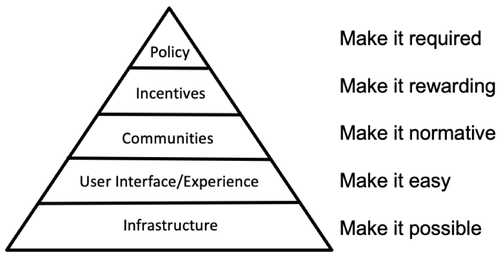
- Triangle adoption plan (image)